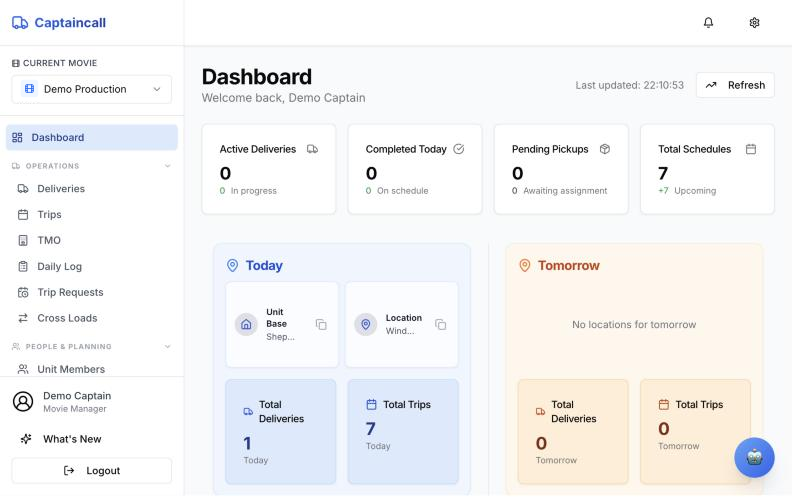
Transport still runs on WhatsApp and spreadsheets
The transport captain is the switchboard for the whole unit. Most of the job is re-typing the same information and chasing people for updates.
Requests everywhere
Pickups arrive by text, email and corridor conversation. Nothing has a reference number.
The plan changes hourly
A call time moves and five drivers, two hotels and a unit base need to know now.
Hours are disputed
Overtime is worked out by hand at the end of the week, from memory and screenshots.
The paperwork takes days
Transport sheets, costed reports and invoices are typed up again from the same trips.
From a department's request to the production's invoice
Each step is one screen in Captaincall. Information is entered once and carried forward.
- 1
Request
A department asks for a pickup or a delivery, with stops and times.
Department - 2
Plan
The day's locations are set and every trip is laid out by time.
Transport captain - 3
Transport sheet
One click turns the day into a PDF for drivers and a privacy-safe one for production.
Transport captain - 4
Drive
The driver gets the job on their phone and updates the status as they go.
Driver - 5
Clock
Shift hours go in, overtime and pay are calculated, the captain approves.
Transport captain - 6
Report
A daily report goes to production. Budget, quote and invoice use the same data.
Production
The day's movements, planned in minutes
Pick the person and the pickup address fills itself from their record. Choose the day's location as the drop-off and assign a driver. Captaincall works out the distance and time.
- Day strip and locations. Set unit base and set once per day; every trip form offers them.
- Automatic returns. Tick "requires a return" and the trip back is created and tracked.
- Quick filters for today's cast, tomorrow, the week's above-the-line and morning pickups.
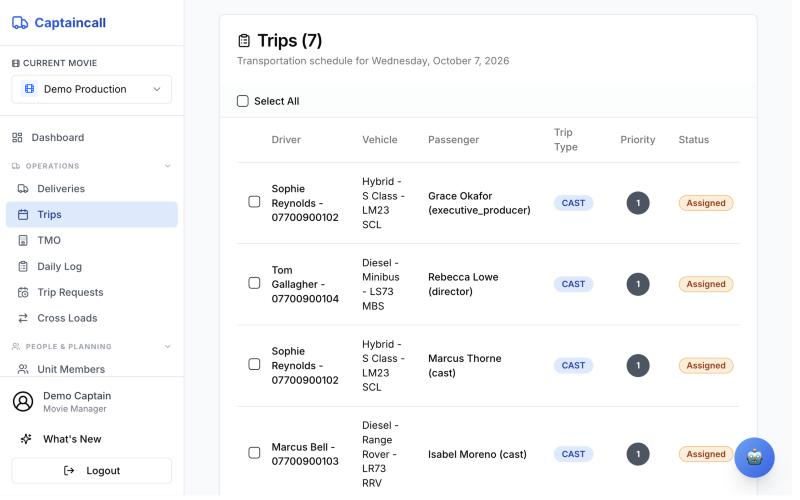
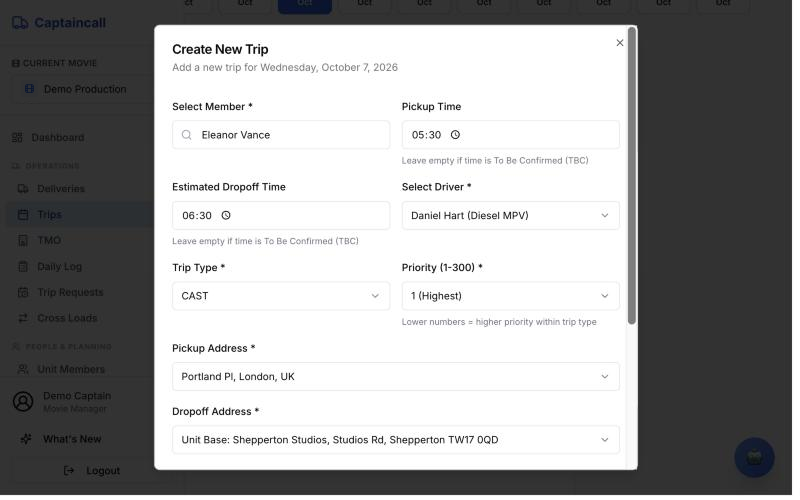
- Main: Today's trips with driver, vehicle, passenger and status.
- Inset: New trip: the pickup address comes from the cast record.
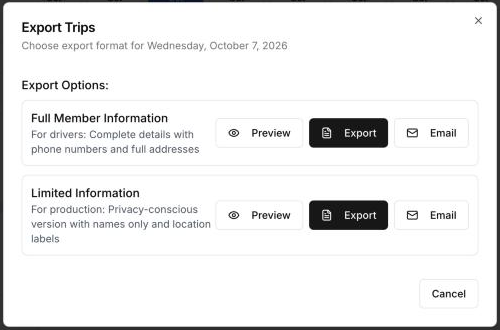
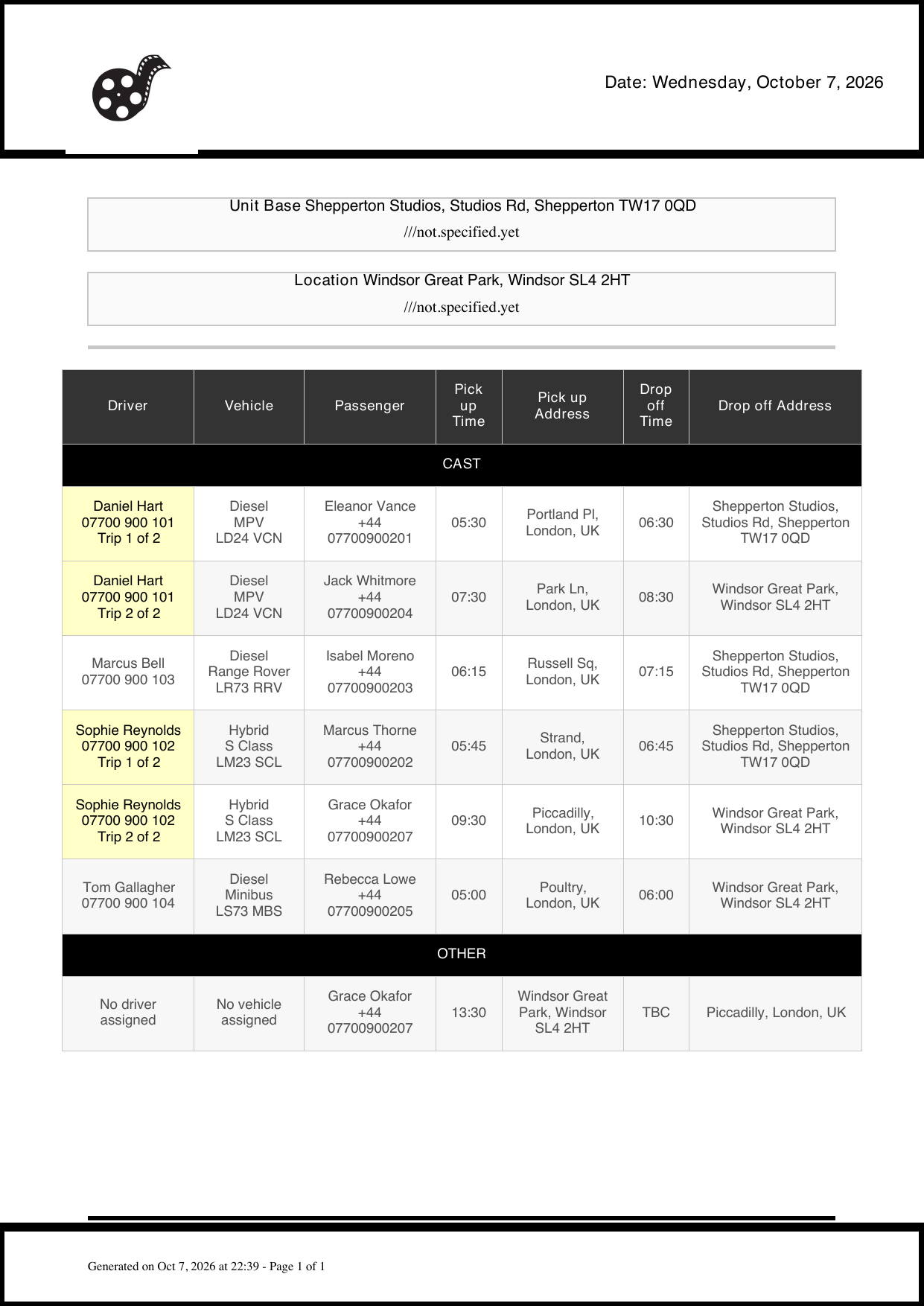
Tomorrow's transport sheet, one click from the trips list
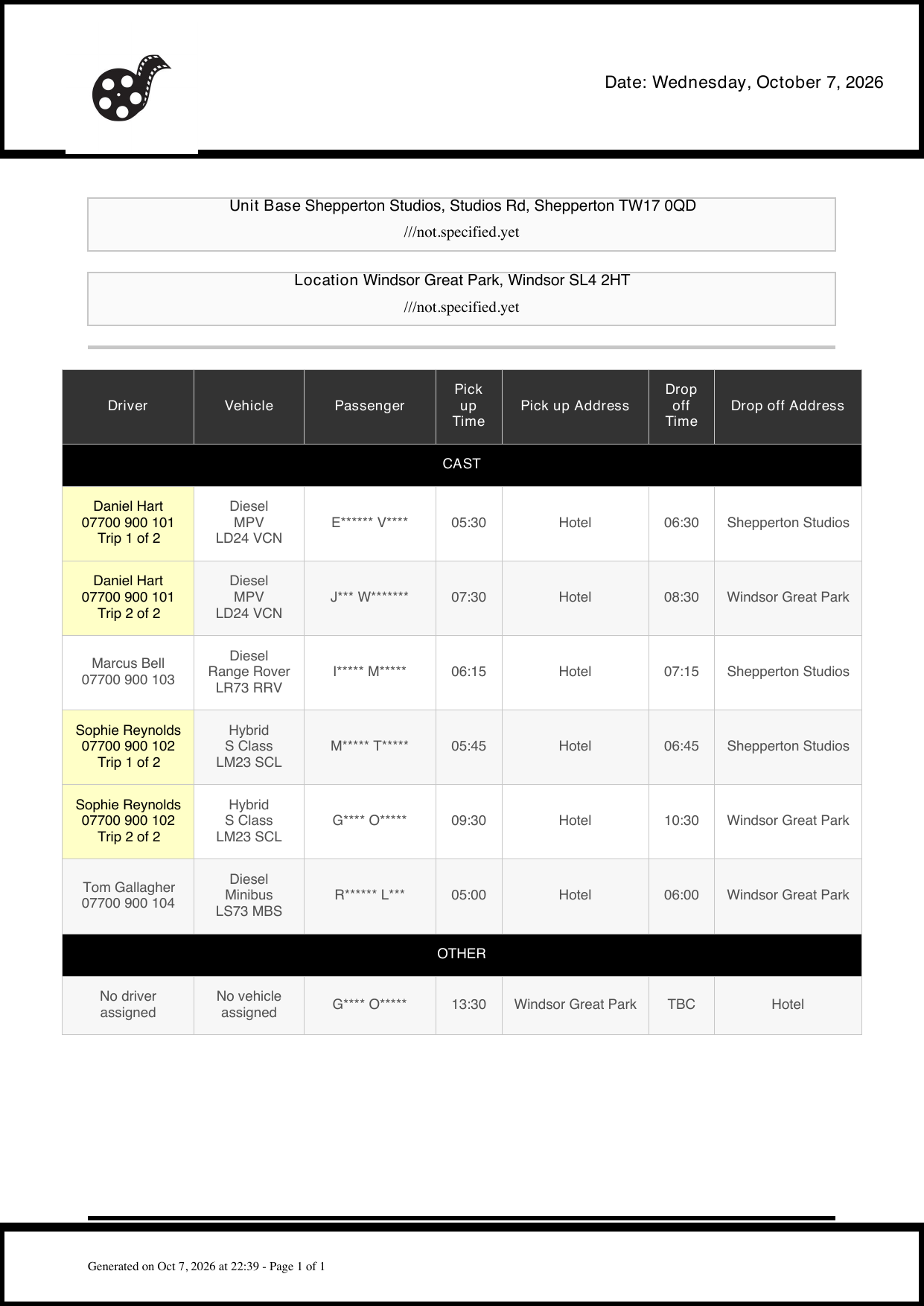
Export turns the day's trips into a ready-to-send PDF. Preview it, download it, or email it straight to drivers and production.
- Full version for drivers: phone numbers, vehicle and plate, full pickup and drop-off addresses.
- Limited version for production: passenger names masked and addresses shown as labels like "Hotel".
- Built for the day: unit base and set at the top, trips grouped by type, drivers with several runs marked "Trip 1 of 2".
Departments ask properly, with every stop
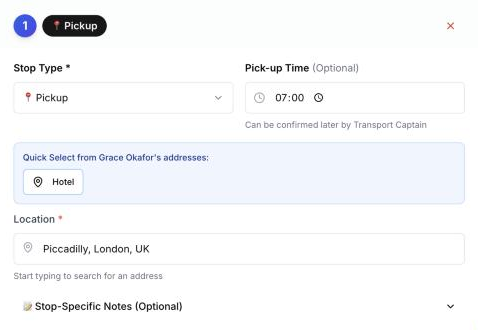
Instead of a text at 11pm, a department submits a request with the passenger, the date and each stop. It gets a reference number and waits for the captain to confirm and assign.
- Multi-stop journeys such as hotel, costume fitting, then unit base.
- Saved addresses for each person appear as one-tap choices.
- A badge on the menu shows the captain what is waiting.

Urgent kit runs reach the captain straight away
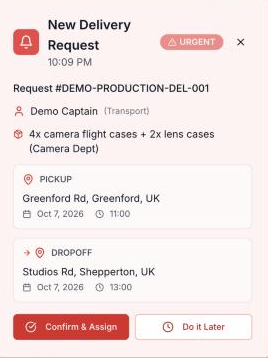
When a department books a delivery, the transport team sees it at once. Urgent ones jump the queue. Confirm and assign a van and driver from the alert itself.
- Live alert with items, pickup and drop-off, times and who asked.
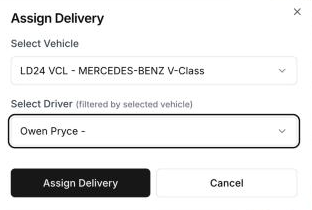
- Two clicks to assign: vehicle first, then the drivers who can drive it.
- Overdue warnings on the dashboard if a pickup time passes.
Drivers work from their phone, not a printout
Each driver signs in with their mobile number. Assigned jobs arrive as a notification with the address, time and passenger. As they work, the status updates the captain's screen.
- One-tap navigation to the pickup and drop-off.
- Passenger link: cast can follow their trip from a shared link, no app needed.
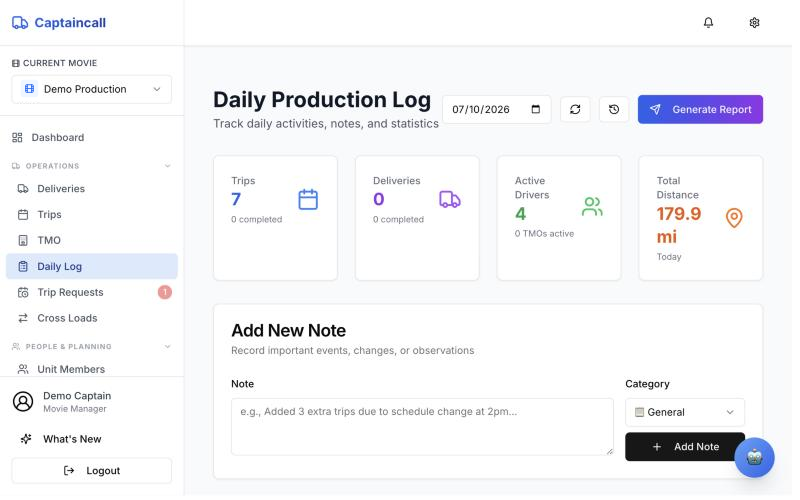
- Distances add up automatically for the daily log.
One unit list that every trip draws from
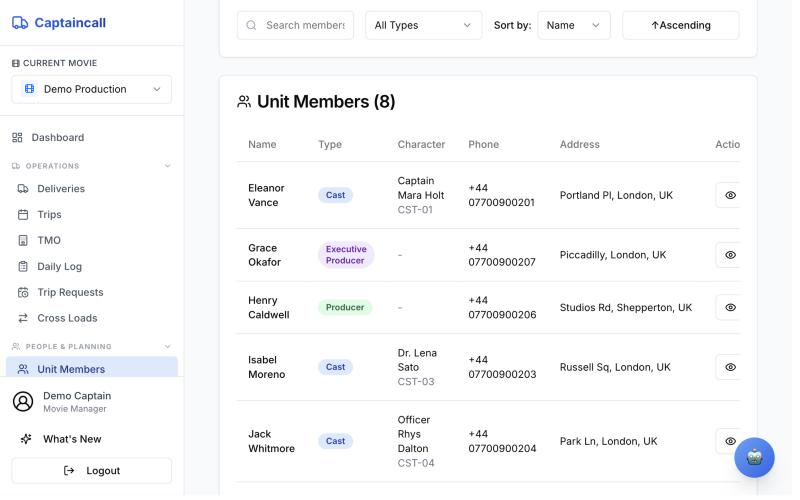
Cast, crew and producers are kept once, with character name and code, phone and up to two saved addresses. Import the Day Out of Days instead of typing the schedule in.
- Character codes (CST-01) as used on the call sheet.
- Address autocomplete from Google Maps.
- Day Out of Days import from the production's PDF or CSV.
Overtime worked out before anyone argues about it
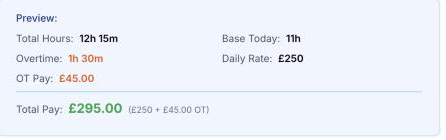
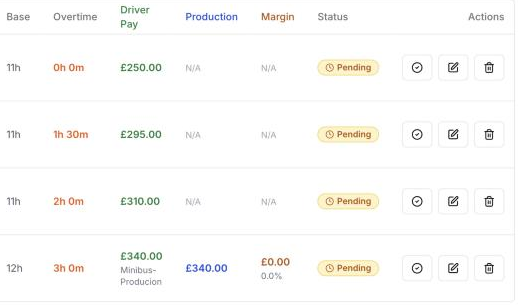
Enter clock-in, clock-out and break. Captaincall applies the day rate, base hours and overtime rate and shows the pay before you save. The captain approves and exports a PDF.
- Default rates with per-driver overrides.
- Calculation methods for different vehicle types and production billing rates.
- Driver pay, production charge and margin side by side for each shift.
The paperwork comes out of the work
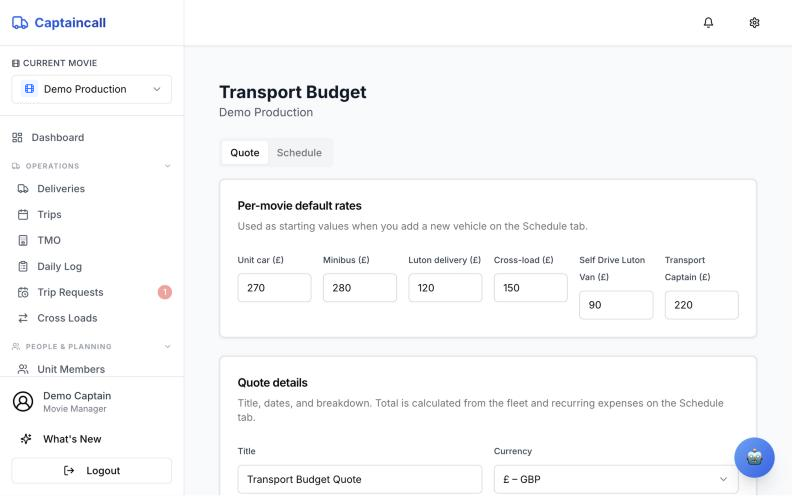
The daily report is generated from the day's trips and deliveries and sent as a PDF. Quotes are built from your own rates, and spend is tracked against the agreed budget.
- Daily production report as PDF, emailed to saved lists.
- Transport budget quote from per-production rates, as PDF or Excel.
- Budget monitoring of spend against the quote, and numbered invoices in the same system.
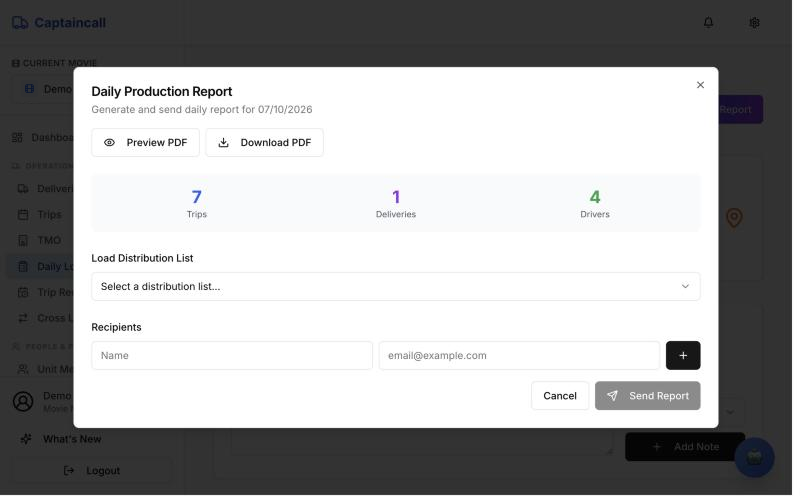
- Main: Daily report: preview, download or send.
- Inset: Your rates drive the quote you send to production.
The rest of the transport job
Cross loads
Moves across several departments, vehicles and destinations, with a named point of contact.
TMO
Transport movement orders for cast staying at temporary locations away from home.
Fleet
Drivers and vehicles with registration, type and fuel, shared across your productions.
Invoices
Numbered invoices from a list of services and your company details, exported as PDF.
Alerts
In-app, email and WhatsApp notifications for new requests and assignments.
Assistant
Type or say a delivery request in plain English and it drafts the form for you.
Four weeks free, set up by us
Run your production on Captaincall before you decide anything. No setup fee, no card, no contract.
- 1Before week 1
We set it up
Your company, rates and production, with your unit list, drivers and vehicles brought in.
- 2Week 1
Start alongside
Run the sheet and requests in Captaincall next to how you work now. Drivers install the app.
- 3Weeks 2 to 4
Run it day to day
Requests, trips, sheets, timesheets and reports from Captaincall, with us on hand.
- 4End of week 4
Decide together
Keep going on an introductory deal, or export your data and walk away.
For our first major productions, we agree an introductory rate when the pilot ends rather than going straight to a rate card.
Your fleet and team, across every show you supply
A company account holds your drivers, vehicles and rates once. Each production you work on gets its own workspace, with access given per person: managers, department staff, and drivers on the app.
- Run several productions at once and see requests from all of them.
- Know your margin per shift, per driver and per production.
- Send a clean transport sheet and report every day.
- 1
We set up your company, free
Your company account, your rates and your first production. No setup fee.
- 2
Bring in the unit list
Add cast and crew, import the Day Out of Days, and add your drivers and vehicles.
- 3
Drivers install the app
They sign in with their mobile number.
- 44 WEEKSFREE
Four weeks free
Run your production on Captaincall for four weeks. If you want to continue, we agree an introductory deal.
Start your free pilot
Tell us about your production and we'll set Captaincall up for you. Four weeks free, no setup fee, no contract.